Tutorials • Commercial
Invoice verification.
Learn how to check invoices in your Hostico client account, including details about the status and outstanding amounts. Follow the simple steps to access it.
Views 1791Updated 2 aniPublished on 08/07/2017by Mark D.
Introduction
This tutorial presents the method for checking the existing invoices in the client account.
Requirements
- existing Hostico customer account
Steps
- After logging into the client account, you will go to the Financial section
- The next page will display the existing invoices in the client account and their status.
The information displayed in the adjacent image represents:
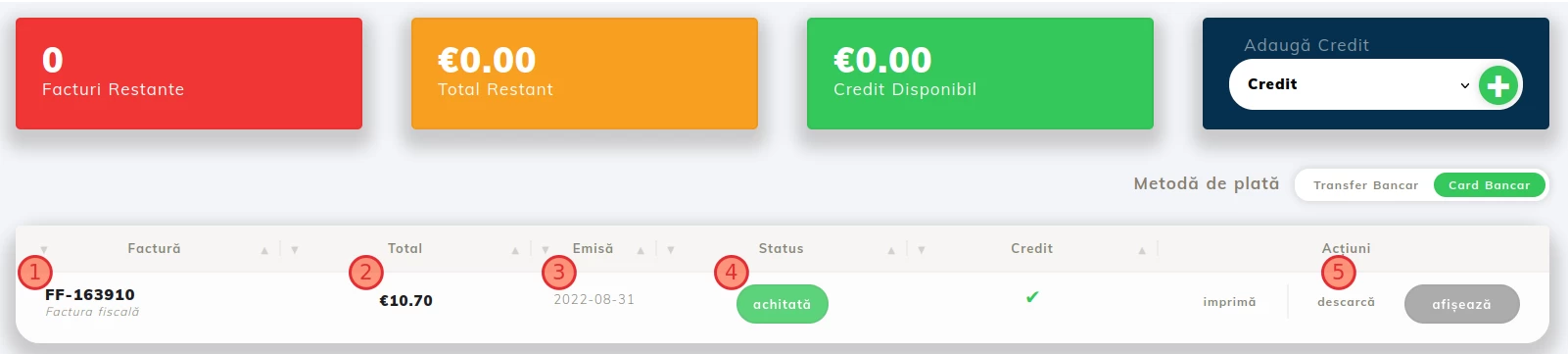
- (1) Invoice - proforma invoice/tax invoice number;
- (2) Total -the remaining/paid amount expressed in euros;
- (3) Issuance date - represents the date on which the proforma was issued by the system (to note - proformas are automatically issued by the system 2 weeks before the due date) for the service that is to be renewed (for hosting) and renewed (for domain);
- (4) Status - displays the status of the invoice - Paid, Unpaid, or Canceled;
- (5) Download - provides the option to download the invoice locally.