Tutorials • Apps
Making a payment using the credit from the client account
Description of the essential steps in paying proforma invoices using the credit allocated in the client account.
1
Views 1197Updated 2 aniPublished on 24/09/2021by Mark D.
Introduction
Presentation of the steps necessary for paying an overdue invoice from the Hostico client account by applying the credit.
Requirements
- Hostico client account;
- Credit available in the client account;
- A pending invoice;
Steps
After logging into the client account, select the Financial section from the menu on the left side of the page;
In the newly opened window, the status of issued invoices in the account will be displayed.
On overdue invoices, the option Apply Credit; will be displayed.
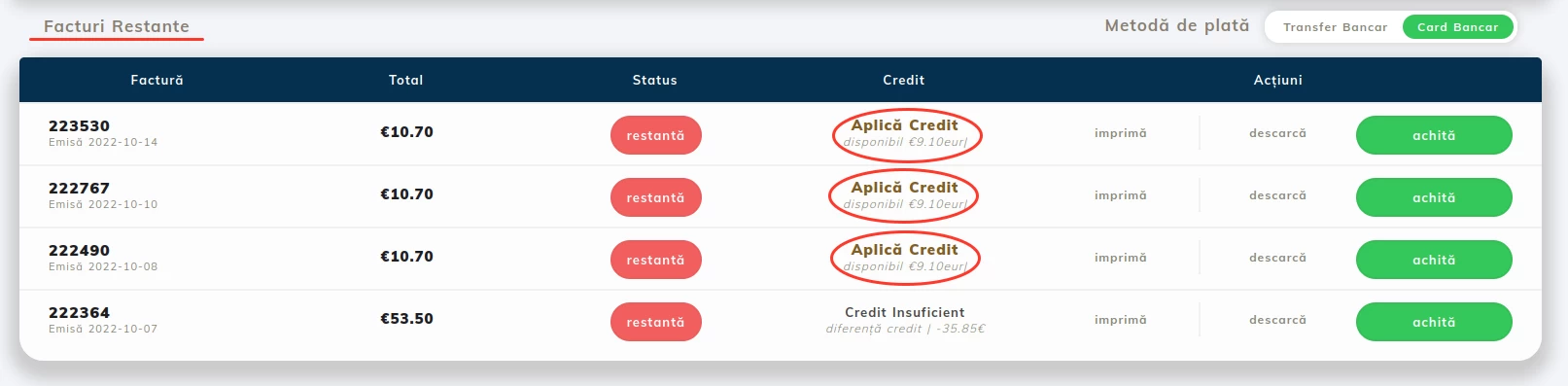 Click on Apply Credit to pay the invoice.
If everything worked correctly, the invoice will be issued and the services automatically extended.
Note:
- The VAT will not be charged on an invoice paid via Credit, as the VAT has been paid on the invoice for adding credit to the client account;
- Credit cannot be applied to an invoice that has been modified or an invoice resulting from the merging of multiple invoices;
- For applying the credit to an outstanding invoice, it must cover the entire amount on it (excluding VAT).
- The credit can be applied only if the payer on the invoice is the same as in the case of the credit top-up invoice