TutorialscPanel

Email forwarding in cPanel

cPanel allows an unlimited number of email message redirects from one mailbox to another, whether it is internal or external.

1
Views 951Updated 1 anPublished on 24/09/2017by Cătălin Adrian

Introduction

This article explains the necessary steps for redirecting messages from an email inbox in the cPanel to another address regardless of its extension.

Requirements

  • a cPanel account
  • an email address on that cPanel account

Steps to Follow

  • after logging into the cPanel control panel, in the interface that will be displayed, we look for the section "EMAIL ADDRESS", and there we click on "Forwarders".Email forwarding cPanel
  • In the window that will open, we will click on 'Add redirect''
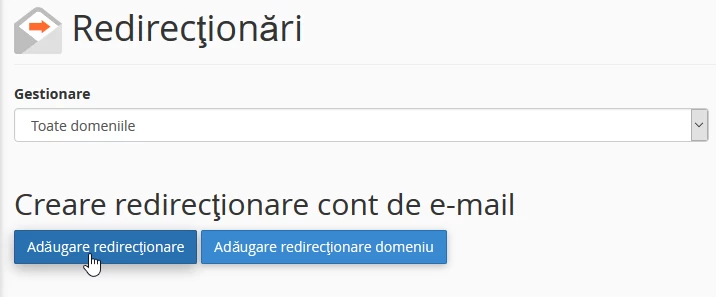
    Adaugare redirectionare e-mail cPanel

  • in the next window we will fill in the box ''Redirect Address'' - the name of the address we want to redirect
  • in the ''Domain'' box we will select the domain on which the email address is created, as there may be multiple in the case where the account hosts multiple domains
  • in the ''Destination, '' box, we will fill in the email address to which the redirect is desired, after which we click on ''Add redirect''
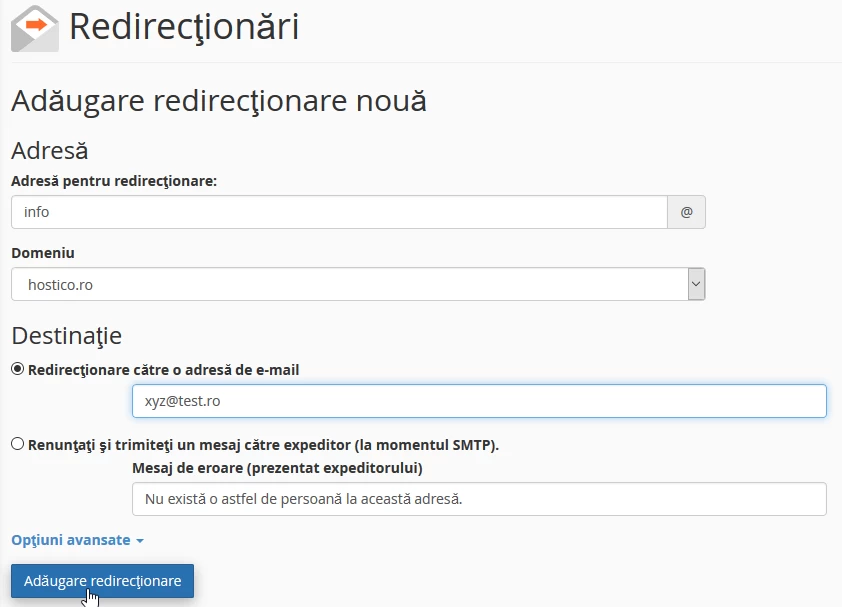
    Adaugare redirectionare catre e-mail dorit


Similar Articles

Transfer .ro domainTutorials /Domains

This tutorial presents the steps necessary to obtain the authorization key from the ROTLD panel for transferring a .ro domain to a new registrar.

77
by Mark Dohi
Views 2454
Updated 1 year ago
Published on 06/02/2018
DNS settings in the Webuzo panelTutorials /Webuzo

Learn how to edit and set DNS records in the Webuzo panel. Follow the steps to effectively manage domains and subdomains.

48
by Alexandru Rogojan
Views 2411
Updated 1 year ago
Published on 14/09/2017
Changing the PHP version in cPanel on VPS hosting packages via MultiPHP ManagerTutorials /cPanel

In this article, we will present the necessary steps to change the PHP version in a cPanel account using MultiPHP Manager.

46
by Sebastian Szlivka
Views 2635
Updated 1 year ago
Published on 18/10/2017
Clear cache and history in Chrome browserTutorials /Apps

Learn how to delete your history and cache in Google Chrome using the Ctrl+Shift+Delete key combination. The tutorial includes simple steps and applicability in other browsers.

36
by Florin Petran
Views 6412
Updated 5 years ago
Published on 08/01/2018
Unblocking the IP from Hostico serversTutorials /Dev

In this tutorial, the necessary steps will be presented to unblock the IP listed in the firewall on Hostico servers.

32
by Mark Dohi
Views 1303
Updated 1 year ago
Published on 05/10/2020