Tutorials • cPanel
Setting file and folder permissions using File Manager in cPanel
In this article, we will present the necessary steps to modify permissions on files and folders on your hosting using the Cpanel File Manager.
Views 1463Updated 2 aniPublished on 12/09/2018by Sebastian S.
Introduction
- There may be situations where we need to change the permissions on files or folders on the hosting. This may be necessary if an application or a site requires it, if we want to block or limit access to a file or folder, and so on. Permissions can be changed in two ways: either using an FTP client or using the file manager provided by the control panel. In this tutorial, we will present the option via the File Manager offered by cPanel.
Requirements
- The cPanel login details, available in the email with the administration data.
Steps
- We will log in to the cPanel control panel, navigate to the Files section, and click on File Manager.

- In the next window, the files on the hosting will be listed.
- To change the permissions, we will navigate to the desired folder or file, right-click, and then select Change Permissions.
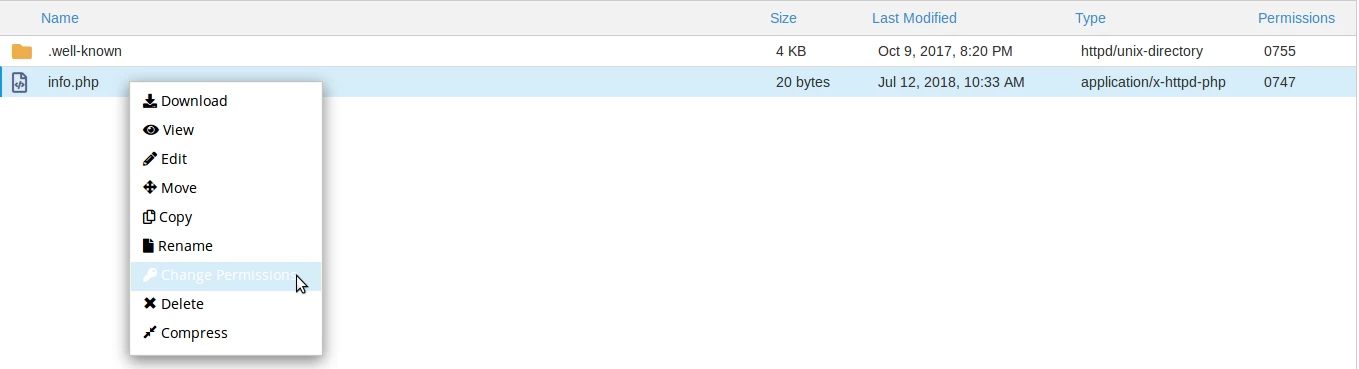
- In the column titled Permissions, we will be able to see the current permissions of the selected file or folder in octal format.
- In the window that will appear, we will have the ability to make the desired settings. We can check the boxes for Read, Write, or Execute permissions for each type of user: User, Group, or Other. Alternatively, we can set the permissions in octal mode using the field Permission (generally, applications that require special permissions provide us with the number that needs to be set).
- After making the settings, we will click on the Change Permissions button.

- From this moment, the permissions will be modified. We can see this in the Permissions column next to the file or folder.