TutorialsPlesk

Exporting a database in the Plesk panel

Learn how to export a database in Plesk by following the simple steps to save the archive on the server or download it locally.

Views 383Updated 1 anPublished on 20/12/2019by Cătălin Adrian

Introduction

This article explains the steps to follow to export a database in a Plesk hosting account.

Requirements

  • an active Plesk hosting account
  • login data in the panel

Steps to Follow

  • after logging into the Plesk control panel, in the displayed interface select "Databases" located in the top right corner of the panel
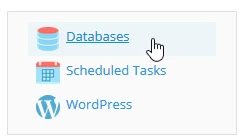
Opţtiunea 'Databases' în Plesk

  • on the next page the "Export Dump" button will be selected
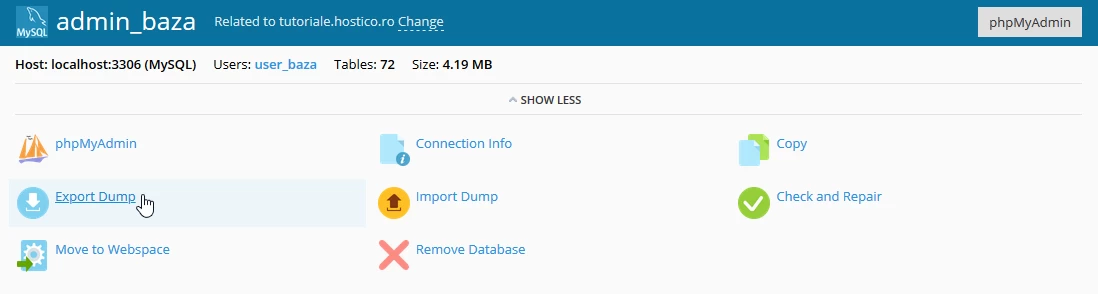
Opţiunea 'Export Dump' Plesk

  • a new window will open where the directory on the server in which to save the archive with the database will be selected, with the option for direct download after the archive is created by checking the box "Automatically download dump after creation" and then the "OK" button is selected
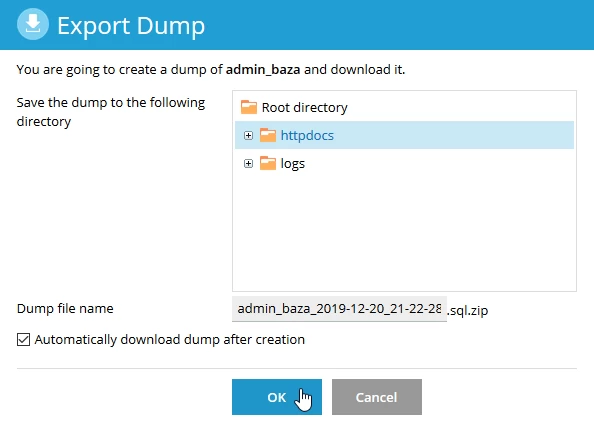
Opţiuni 'Export Dump' Plesk

  • a confirmation message will appear in the bottom right corner
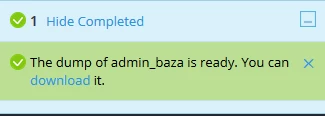
Confirmare creare dump sql Plesk

  • after which a pop-up will automatically appear from where the database can be saved locally by pressing the "OK" button or, depending on the browser used, it will be downloaded automatically.
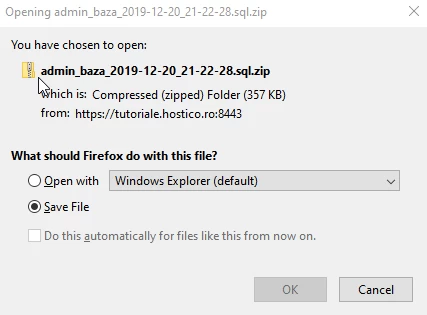
Salvare dump sql Plesk

Similar Articles

Adding an alias domain in the Plesk control panelTutorials /Plesk

In this tutorial, we will show you how to add an alias domain in the Plesk control panel.

4
by Florin Petran
Views 1129
Updated 1 year ago
Published on 29/05/2019
Creating a Plesk mail accountTutorials /Plesk

Learn how to create and access an email box in Plesk, step by step, to efficiently manage your online communications.

1
by Alexandru Jurca
Views 542
Updated 1 year ago
Published on 16/07/2021
Creating individual management panels for Plesk resellingTutorials /Plesk

This article explains how to create and provide access to specific subscriptions in the Plesk administration panel.

by Cătălin Adrian
Views 835
Updated 1 year ago
Published on 23/08/2019
Adding an additional domain in the Plesk administration panelTutorials /Plesk

In this tutorial, we will show you how to add an addon domain or supplementary domain in the Plesk administration panel.

by Florin Petran
Views 799
Updated 1 year ago
Published on 29/05/2019
Authentication in the Plesk panelTutorials /Plesk

Learn how to log in to the Plesk panel using the VPS domain and the correct port. Follow the simple steps for quick and secure access.

by Cătălin Adrian
Views 738
Updated 1 year ago
Published on 15/07/2021