Tutorials • WHM
Changing the characteristics of multiple cPanel accounts simultaneously
In this article, we will present the steps necessary to modify the features on multiple cPanel accounts simultaneously using the Multi Account Features, specifically Modify/Upgrade Multiple Accounts.
Views 958Updated 4 aniPublished on 24/01/2018by Sebastian S.
Introduction
- The WHM control panel provides the ability to modify the features of multiple cPanel accounts simultaneously. This functionality is provided by Multi Account Functions, specifically Modify/Upgrade Multiple Accounts, and allows you to modify: the reseller, theme, language, hosting package, and other cPanel account settings.
Requirements
- In order to start the modifications, we will need the WHM authentication details. These can be found in the email containing the management details of the VPS or the reseller package.
Steps
- Once the WHM control panel is accessed, in the main interface, we will click on Multi Account Functions. Alternatively, Multi Account Functions can also be found using the WHM search field, located at the top left of the page.

- Next, we will click on Modify/Upgrade Multiple Accounts.

- In the next window, we will be able to choose the accounts for which we want to make changes by selecting the checkboxes in the displayed table. The table contains columns with the main domain name, user, owner, package, and cPanel theme. On the right side of the table, we will be able to use an automatic account selection feature, based on certain criteria, such as: domain name, user, owner, package, and theme. This functionality is useful in case we have a larger number of accounts for which we want to make changes.
At the bottom of the table, we will find the actual options that we can modify:
-Reseller - we can change the owner of the accounts.
-Theme - change the theme of the accounts.
-Start Date - the creation date of the accounts can be modified.
-Locale - change the language used in the accounts.
-Package - modify the hosting packages of the accounts.
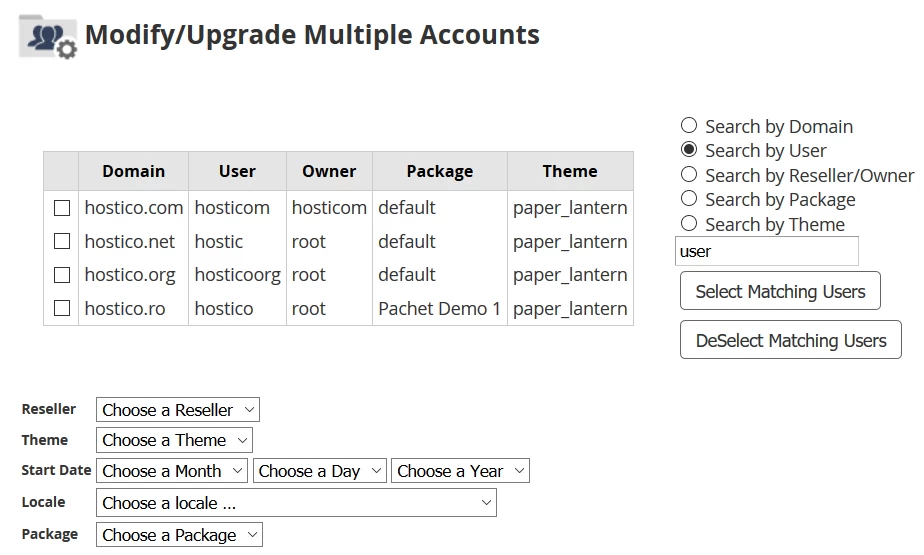
- As an example, we will make changes to the accounts: hostico.net, hostico.org, and hostico.ro. Using the selection fields below the table, we will change the account owner to "hosticom," the package to Demo Package 2, and the language used to Romanian. After that, we will click the Change button.

- If everything went smoothly, we will be greeted by the message All Modifications Complete.